Base style & word highlights
Choose your font, size and colors. Give active words their own treatment with outlines, shadows and emphasis.

Build a caption workflow that keeps up with your ideas.
 GOOD IDEAS
Start with a preset, then shape the words, rhythm and placement around your story.
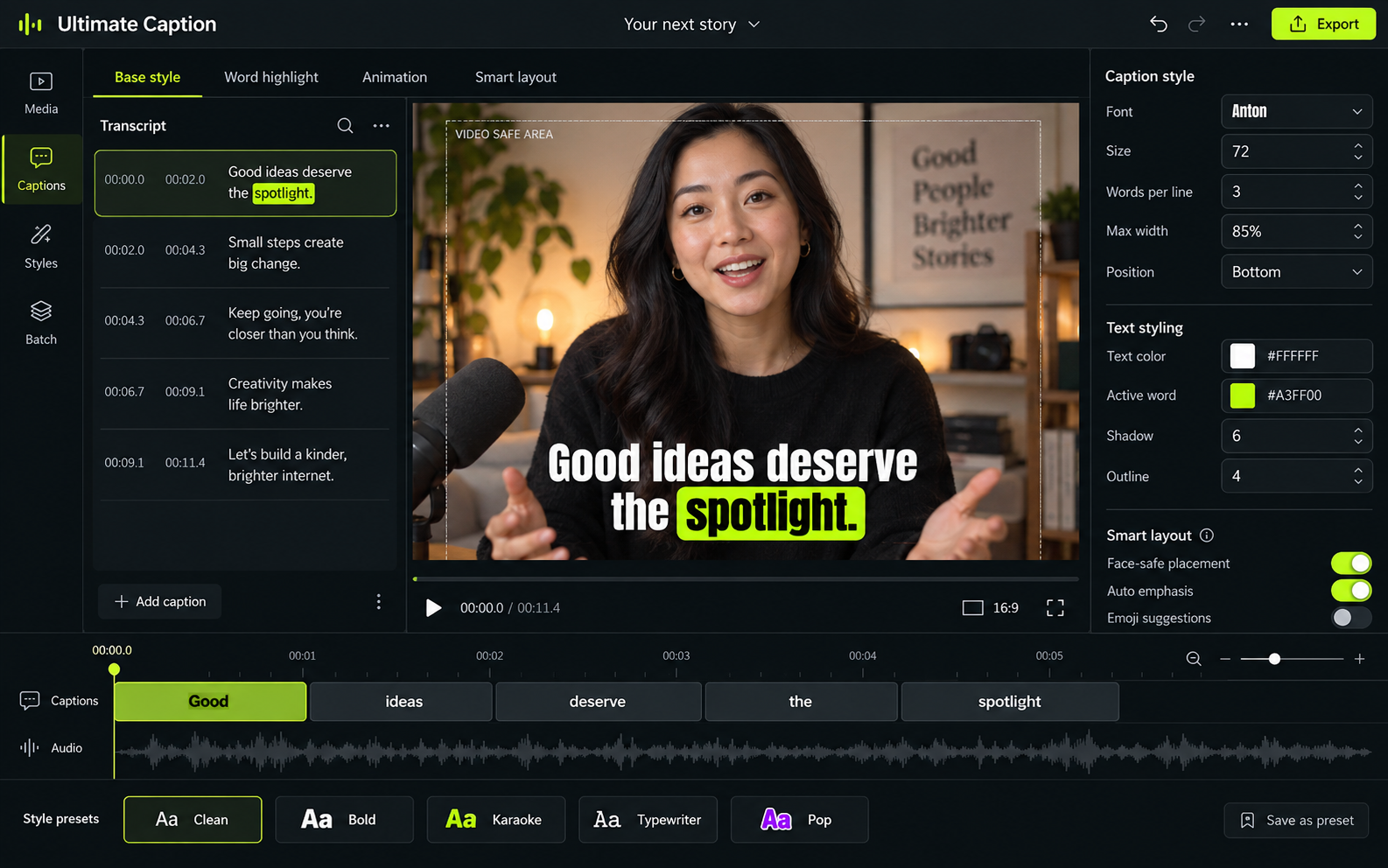
Choose your font, size and colors. Give active words their own treatment with outlines, shadows and emphasis.
Control the target words per caption, line width and overflow. Keep a short punchy phrase or let a sentence breathe.
Explore pop, fade, karaoke and typewriter treatments. Pair entrance and exit animation with a clear reading rhythm.
Smart tools help with the repetitive details, while you stay in charge of the final result.
Face-aware placement and emoji suggestions are part of the planned desktop feature set.
MAKE SPACEAdd a group of videos, choose a saved style and let the queue take care of the repetition. Review the output before it goes anywhere.
Use your computer for caption generation, with no monthly minute allowance for the local workflow.
Try another style, refine a word and export again. Keep creating without an export quota.
Keep your source videos and exported work on your machine. Optional online services will be identified separately.
Your voice. Your style. Your captions.
CREATE EDIT STYLE EXPORT
ALL ON YOUR DESKTOP